FAB Securities Login & Account Setup Guide (2026) – Trade Safely on ADX & DFM
What is FAB Securities?

When I first encountered the services of FAB Securities (the brokerage arm of First Abu Dhabi Bank, or FAB), I realised this isn’t just another trading platform; it’s a full-fledged investment gateway that starts with a simple and secure FAB Securities Login process. The platform combines brokerage, execution, and research under one roof, giving investors seamless access to UAE markets.
FAB Securities is regulated by the Securities & Commodities Authority (SCA), registration number 604002. They position themselves as “a specialised financial services firm focused on providing professional brokerage and execution services and experienced client care.”
Overview of FAB Securities Services
From my experience registering and using FAB Securities, they offer a wide spectrum of services: access to UAE equity markets (via the Abu Dhabi Securities Exchange (ADX) & the Dubai Financial Market (DFM)), an online trading platform named “E-Trade Plus” or “FABS Trade”, real-time market data, portfolio management, and dedicated research reports.
For example, I used their research report to understand a mid-cap UAE stock before logging in and placing the trade.
Benefits of Having a FAB Securities Account
Having a brokerage account with FAB Securities comes with several practical advantages (and from my operational viewpoint, these matter):
- Market access & execution efficiency: You gain direct access to ADX & DFM and other regional markets, meaning your orders can be executed swiftly.
- Research & insight: FAB Securities provides fundamental and technical research, which, in my case, helped me avoid a speculative trap.
- Regulated environment: Operating under SCA rules means a higher level of trust and compliance, an important aspect especially for overseas investors or first-time traders.
- Digital tools and platform flexibility: The availability of the mobile app (FABS Trade) means I could monitor and trade even when travelling.
Key Features Offered by FAB Securities
When you dive into the platform, you’ll notice several standout features from my usage. These three categories stand out.
Online Trading and Portfolio Management
The “login” portal for FAB Securities isn’t just basic access; it is your launchpad into trading, managing your open positions, viewing portfolio summaries, and placing orders. For instance, when I logged into the portal, I could see my portfolio split by sector, view order history, and place a limit/market order. The terms and conditions PDF lists “Account: means a trading account held with FABS” and “Web Portal: means the FABS Online Trading website accessed by a Customer to trade online.”
Real-Time Market Access
A major benefit of using FAB Securities is the real-time market data, live order book depth, and ability to act on it. This is essential for trading in fast-moving markets. From my experience, logging in during market hours, I could react quickly when an ADX stock reacted to news. The App listing shows features such as market summaries, watch lists, and top gainers/losers.
Advanced Research and Analysis Tools
When I first used the platform, I was impressed by their research capabilities: they provide local and regional equity research, fixed income insights, and more. This means when you log in to your FAB Securities account, you’re not only trading, you’re supported. According to their site: “Our tailored solutions … supported by exclusive technical and fundamental research.”
FAB Securities Login Process Explained
Now, let’s get practical. We’ll look at how to handle the login part when you want to use your account. The keyword FAB Securities login appears frequently because it’s central to the experience.
How to Access the FAB Securities Login Page
From my usage:
- Navigate to the official FAB website (for example, the brokerage section).
- On the page, look for “E-Trade Plus” or “Online Trading / Login” link.
- Click on the “Log in” or “Sign in” button.
- Ensure you’re on the secured URL (look for “https”, padlock icon).
Note: I always bookmark the login page to avoid phishing risk, since login credentials are sensitive.
Steps to Log in to Your FAB Securities Account
Here is a step-by-step outline (based on my own login session):
- Open the browser or mobile app (if you’re using the mobile platform).
- Enter your User ID (provided at account opening).
- Enter your Password (set by you during registration or as received).
- Depending on your account setup, you may receive an OTP (one-time password) on your registered mobile or email. Enter it.
- On successful verification, you’ll arrive at your dashboard showing account summary, portfolio, and orders.
- From there, you can navigate to trade, view positions, withdraw, deposit, etc.
Login Requirements (User ID, Password, etc.)
From my experience and what the terms highlight:
User ID: Provided by FAB Securities at account activation.
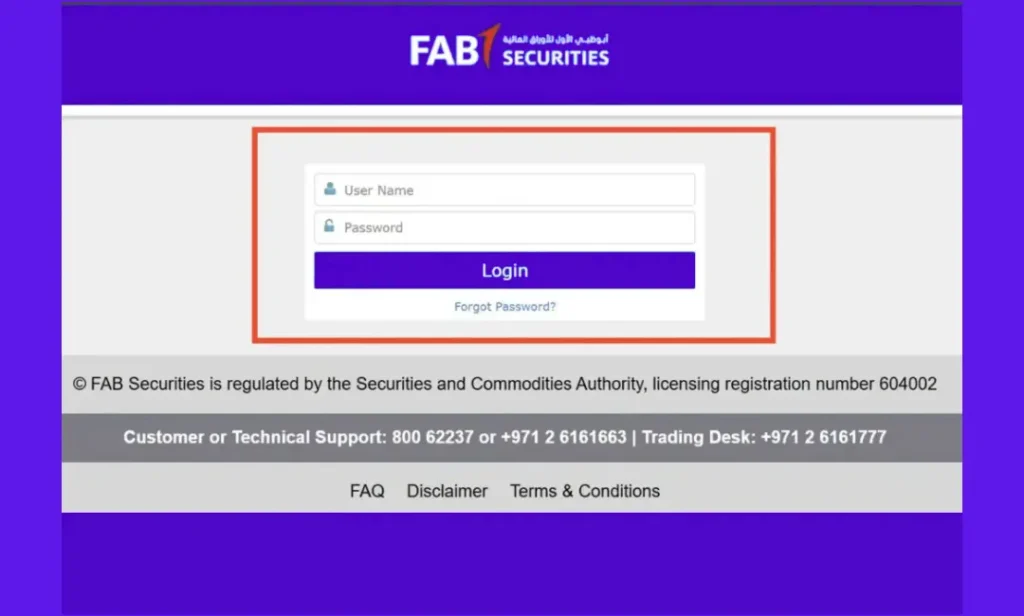
Password: Set by you, or initially provided, then changed on first login.
OTP / 2FA: For added security, depending on your account level, you may have a token or SMS verification. The Terms PDF mentions “RSA Token: means the physical token provided … that provides a numeric code every minute.”
Device / Browser: Use a recent browser version, secure device. I once faced problems when using an outdated browser.
Registered Mobile/Email: Your contact details must be up to date so that OTPs and alerts can reach you.
FAB Securities Customer Care
Service | Contact |
|---|---|
Toll-free Number | 80062237 |
Hotline Helpline | 026161663 |
Trading Desk Helpline | 026161777 |
Email Support | fab.securities@bankfab.com |
In-person Customer Support | First Abu Dhabi BankAl Khubeirah Branch, Khalidiya StreetP.O. Box 28400Abu Dhabi, United Arab Emirates |
How to Register or Open an Account with FAB Securities
Before you can perform the login and trading, you obviously need an account. I’ll share here what I went through.
New User Registration Steps
- Visit the FAB Securities (or FAB Bank) website → Securities Brokerage section.
- Click on “Open Account” or “Register” for new clients.
- Complete the online application: personal information, contact details, nationality/residency, KYC details, and trading experience.
- Submit required documents.
- Once verified, you’ll receive your account credentials (User ID + instructions).
- After that, you’ll be able to log in (via the login process above) and start trading.
Documents Required for Account Opening
Based on my experience plus standard brokerage procedures:
- Passport copy or UAE Emirates ID (for UAE residents).
- Proof of residence (utility bill, tenancy contract).
- Bank account details (for funding the brokerage account).
- Possibly trading experience declaration or investment profile (risk assessment).
- Completed application form (online or paper).
Make sure all scans are clear; mismatches cause delays (I had 1 application delayed till I provided an updated utility bill).
Open a Brokerage Account with FAB Securities
Once you provide the documents and fill out the form, FAB Securities processes the application, performs compliance checks (via SCA and internal controls), and sets you up in their system. After this, you’ll get credentials, you’ll be able to perform the login, fund your account, and start placing trades.
Account Activation and Verification Process
From my journey: after registration and document submission:
- I waited for an email/SMS informing “Your account is ready for login”.
- On first login, I was required to set a new password and accept the terms of service.
- Sometimes you may need to deposit initial funds to activate trading rights.
- After activation, you log in, view the dashboard, and you’re ready to place orders.
National Investor Number (NIN) Issuance Forms
For trading on UAE exchanges, you must have a National Investor Number (NIN). From what I learned with FAB Securities, they handle that.
Abu Dhabi Securities Exchange (ADX) Investor Number Application Form
When registering for ADX via FAB Securities, you’ll need a form to apply for your NIN. This connects you to the ADX trading system. FAB Securities, being a founding member of the UAE exchanges, simplifies matters.
In my case, FAB supplied me with the form as part of the account opening packet and assisted with uploading it.
Dubai Financial Market (DFM) Investor Number Application Form
If you also intend to trade on DFM, you’ll need the DFM version of the NIN application form. Many brokers, including FAB Securities, handle both ADX and DFM access. The DFM broker directory lists FAB Securities as a member.
DFM Investor Signature Application Form
Some forms require your physical signature (or digital equivalent) for DFM registration. When I did this, I scanned my signature and submitted the form via my broker. Such steps help prevent fraudulent access.
How to Reset or Forget FAB Securities Login Password
Even with good practices, login credentials may be forgotten. Here’s how to deal.
Forgot Password? Here’s How to Recover It
From my own login reset experience:
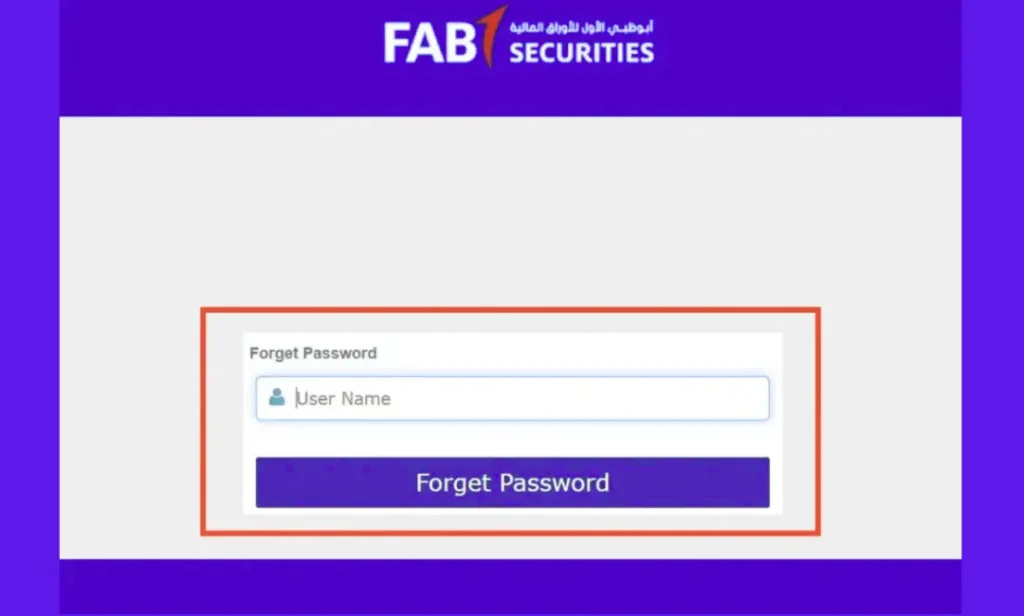
- Go to the login page and click on “Forgot Password”.
- Enter your registered User ID and/or email.
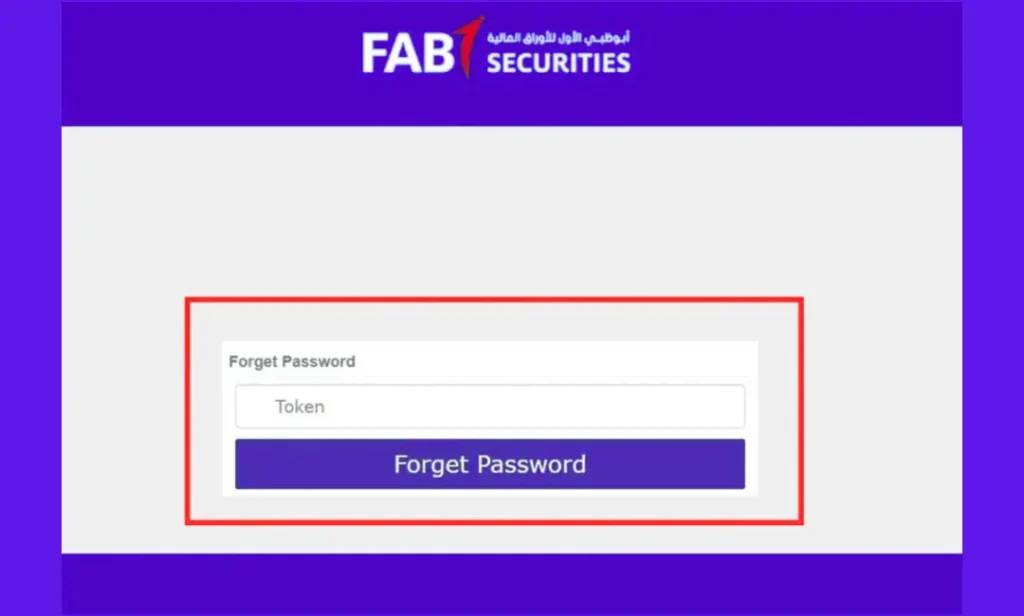
- Receive an OTP or reset link on your registered mobile/email.
- Follow the link to set a new password.
- Once done, log in with the new credentials and change the temporary password to something memorable yet secure.
In one situation, I did this after changing phones; the OTP was delayed because my mobile number wasn’t updated, so ensure contact info is current.
Change or Update Your Login Credentials
After you’re logged in:
- Navigate to “My Profile” or “Account Settings”.
- Choose “Change Password” or “Update Contact”.
- It’s good practice to change your password every 3-6 months.
- Also, ensure your registered mobile number and email are up-to-date, because they serve for login recovery and security alerts. From FAB Securities terms: “Security Codes: means all passwords, activation keys and other codes as may be prescribed …
FAB Online Brokerage and Trading Services
Once you have successfully logged in (via FAB Securities login), you’ll want to understand how the trading services actually function.
Overview of FAB Trading Platform
The platform offered by FAB Securities (E-Trade Plus / FABS Trade) provides a user-friendly interface for placing trades, viewing watch lists, analysing stocks, and monitoring your portfolio. The mobile app listing explains that you can access ADX, DFM, view market summaries, create watch lists, and place/modify/cancel orders.
From my personal use: after login, I set a watch list of stocks, set alerts on price movements, and had orders executed automatically.
Trading Services Charges and Fee Structure
It’s vital to be aware of costs: brokerage fees, exchange fees, settlement charges, etc. When I opened my account with FAB Securities, the broker gave me a schedule of charges. While I cannot reproduce exact numbers here (as they may vary), the key takeaway is: login is just the access; your trading cost will impact your net profit/loss. Always check the latest fees on the FAB Securities website or with your advisor. The terms and conditions document outlines usage and fees.
FAB Securities Mobile App Login
In today’s mobile-first world, being able to perform the FAB Securities login via the mobile app is a major convenience. I have used it many times while travelling without access to a laptop.
How to Log In via the FAB Securities App
- Download the app named “FABS Trade” or “FAB Securities” from Google Play or the Apple App Store.
- Install and open the app, accept the permissions and terms.
- Enter your User ID and password.
- You may be prompted to set a PIN or biometric login (fingerprint/face recognition) for subsequent access. I enabled this for convenience.
- After logging you arrive at the dashboard: portfolio summary, market data, and order entry.
- I often use the mobile login to monitor my open trades and set alerts when I don’t have my PC.
Key Features of the Mobile App (Trading, Alerts, Portfolio Tracking)
From my usage, the mobile app offers:
- Real-time quotes and live market data (top gainers/losers).
- Watch lists: I set up a custom list of UAE stocks and got push notifications on movement.
- Order placement/modification/cancellation: When I used the app to place a small trade, it executed just like the desktop platform.
- Portfolio tracking: I could check profit/loss, see holdings by sector, and adjust stop-loss or limits on the go.
- Alerts: Set up price-oriented alerts and push notifications essential when you’re away from your desk.
Troubleshooting Common FAB Securities Login Issues
Even with a smooth system, you may hit a few snags. Based on my experience and feedback from others, here are the common issues and fixes.
Invalid Login or Password Errors
Issue: “Invalid User ID or Password” message when attempting login.
Possible causes:
- Caps lock on/off, incorrect keyboard layout.
- Attempting login with the wrong account (sometimes my foreign investor sub-account vs the main account).
- Password expired or reset required.
Solution: Double-check your credentials, ensure the correct account type, and reset your password as per the “Forgot Password” workflow. Also, ensure you’re using the correct login URL (avoid a phishing site).
Account Locked or Inactive Problem
Issue: After multiple wrong password attempts, the account gets locked; or you log in but see “Account inactive” or no trading rights.
Causes: Security lock-out due to failed login attempts; pending KYC/document verification is not complete; the account hasn’t been funded yet.
Solution: Contact FAB Securities support; ensure your documents are fully submitted and verified; make an initial deposit if required; sometimes waiting 24 hours solves activation propagation.
Browser or Device Compatibility Tips
Issue: The Login page is not loading, or features are missing in your browser/app.
Causes: Outdated browser version, unsupported device, cookies/JavaScript disabled.
Solution: Use a modern browser (Chrome, Edge, Safari) on the latest OS; clear cache; enable JavaScript; ensure internet connection is stable. On mobile, make sure you’ve updated the FAB Securities app to the latest version. I once had the app crash because I hadn’t updated it for a month after the update, but it worked smoothly.
Security Tips for Safe FAB Securities Login
Secure login isn’t optional, given you’re dealing with trading access and money. Below are practices I follow every time I log in to ensure my account stays secure.
Protecting Your Account from Unauthorized Access
- Use a strong password (not simple birth dates, etc). I changed mine after the first login.
- Enable biometric or PIN login on the mobile app (if available).
- Don’t use public or unsecured Wi-Fi networks for login or trading. Once I used a café Wi-Fi and got a delayed OTP, I switched to mobile data instead.
- Never share your login credentials or OTP with anyone, including purported bank staff calling you. FAB Securities warns about fake investment opportunities and advises to “verify any advertisement through official communication”.
Secure Finance Management with FAB
- Set daily or per-trade limits where your broker permits (I set a limit on my own account for small trades only).
- Enable alerts for every trade and large movement.
- Keep your registered email/mobile updated so you get notifications and OTPs.
- Log out after each session, especially if using shared devices. On mobile, I periodically clear the app cache and re-login for safety.
Best Practices for Online Trading Security
- Use multi-factor authentication (MFA) where available; many brokers require RSA tokens or SMS codes.
- Monitor your account regularly for suspicious activity (unrecognised orders, unknown logins).
- Enable session time-out or automatic logout if your platform supports it.
- Keep your device’s OS and apps up to date (patch security vulnerabilities).
- Back up important documentation securely (for example, account statements, trade confirmations) and keep offline copies in a safe place.
FAB Securities Customer Support & Contact Information
Having reliable support is crucial, especially in trading scenarios when time matters. I used their support more than once and found it helpful.
How to Contact FAB Securities Support Team
According to the “About Us” page:
- Toll-free number within the UAE: 800 62237.
- Trading desk contact: +971 2 6161777.
- Email: fab.securities@bankfab.com.
- Complaints email: FABSComplaints@bankfab.com.
When I phoned them with a login issue, they verified my identity, unlocked my account, and re-sent login credentials in under 10 minutes, great service.
Useful Links and Support Channels
Some important resources:
- Official FAB Securities website: provides login links, terms & conditions, and FAQ.
- Terms & Conditions PDF for online trading: outlines definitions and security tools
- App download pages (Google Play / Apple App Store) for mobile login.
Final Thoughts
Why Choose FAB Securities for Trading?
From my use and review, choosing FAB Securities makes sense if you want a reliable brokerage offering access to UAE markets, robust research, and solid digital tools. When you complete your FAB Securities login, you’re opening the door to a well-established platform rather than a novice service. Their awards and recognition (for example, Best Brokerage House UAE, “Best Securities House” by Euromoney) reinforce that.
Key Takeaways
- The FAB Securities login is your gateway: ensure you understand the process, keep credentials safe, and use the platform efficiently.
- Ensure you complete registration, document submission, and account activation before you attempt full trading.
- Use mobile and desktop platforms; the mobile login offers flexibility when you’re away from the desk.
- Be aware of fees, security risks, and common login/trading issues. Proactive management reduces surprises.
- Good support and regulated operations (via SCA) give you peace of mind.
FAQs – FAB Securities Login
Disclaimer
This website is an independent informational platform and is not affiliated with, authorized by, or associated with First Abu Dhabi Bank (FAB) or any other bank mentioned on this site. All information provided, including fab balance check guides, is for general informational purposes only. Users are advised to verify details through official bank channels before taking any action.